

Bad Data Architecture = Bad AI Outputs (Sponsor)

POV: You connected an AI agent to your industrial ops data and it gave wrong answers to even the most basic questions.
Why?
AI needs context. Your database architecture matters, and split data won’t cut it.
TigerData puts everything in one PostgreSQL + TimescaleDB instance for you, and lets the schema do the work.
Close the AI agent readiness gap by querying through MCP.
Motivation
Claude Code has a feature that 90% of developers either ignore or use wrong.
It’s called Skills.
And it’s the difference between a $200/month autocomplete and an autonomous teammate that actually knows your codebase, your conventions, and your deployment process.
I’ve built dozens of skills across my projects. Most of them started as a single markdown file. That was the mistake. In this article I will tell you exactly what really works.
Let’s start.
Skills Are Folders, Not Files
This is the #1 misconception.
Most devs create a SKILL.md, write 20 lines of instructions, and call it a day. That’s like writing a README and calling it a codebase.
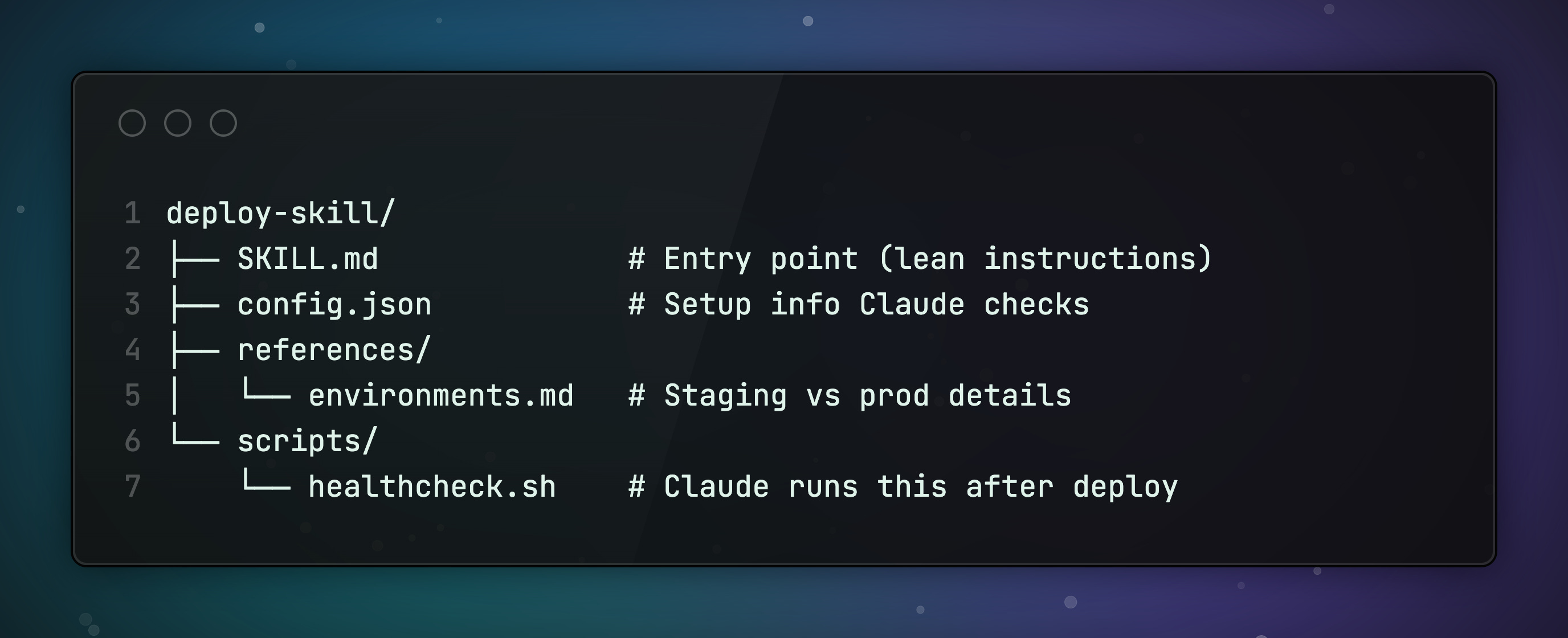
A skill is a directory. SKILL.md is just the entry point.
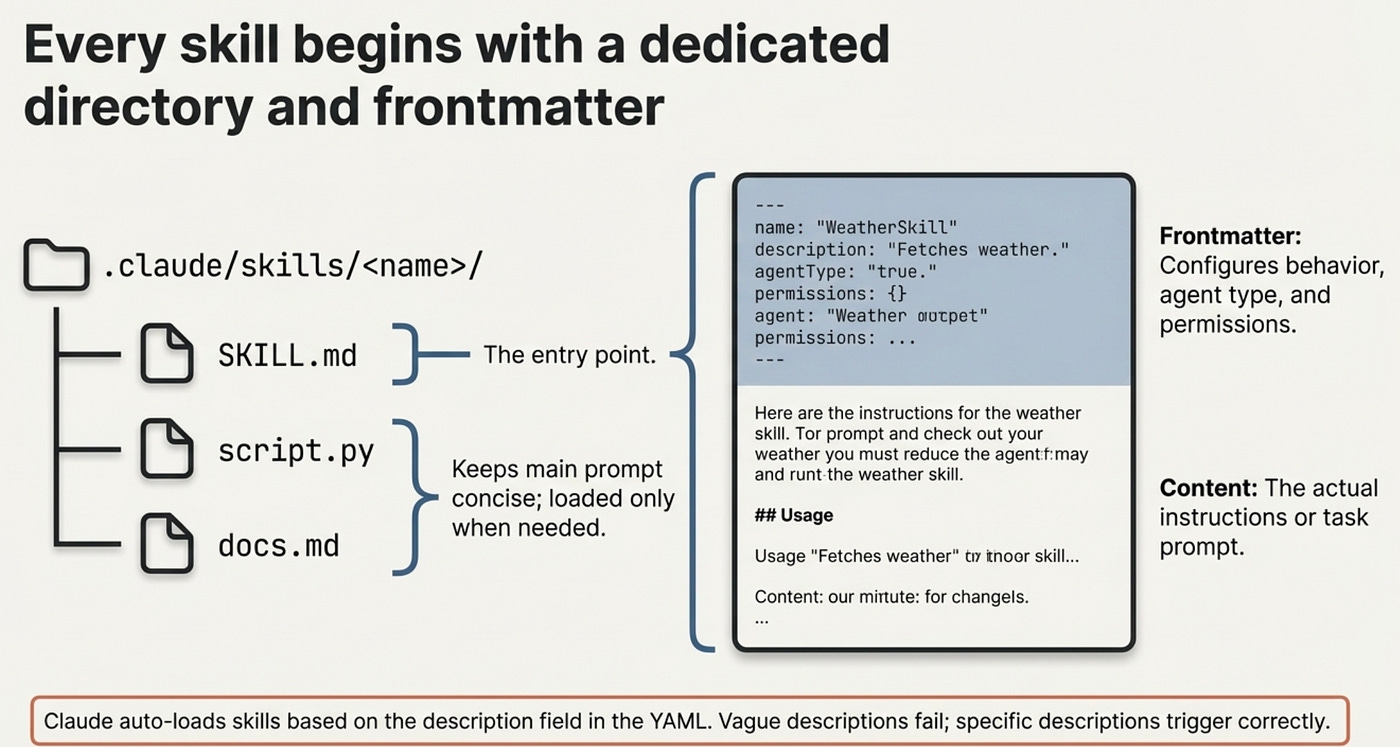
The real power is in the supporting files. Scripts Claude can execute. Reference docs it reads on demand. Templates it fills in. Config files it checks.
Claude only loads supporting files when it needs them. This is called progressive disclosure. Your main prompt stays lean. The details live in files Claude discovers as it works.
The Frontmatter Controls Everything
Every SKILL.md starts with YAML frontmatter between --- markers. This is where you configure how the skill behaves.
Here’s a real example:
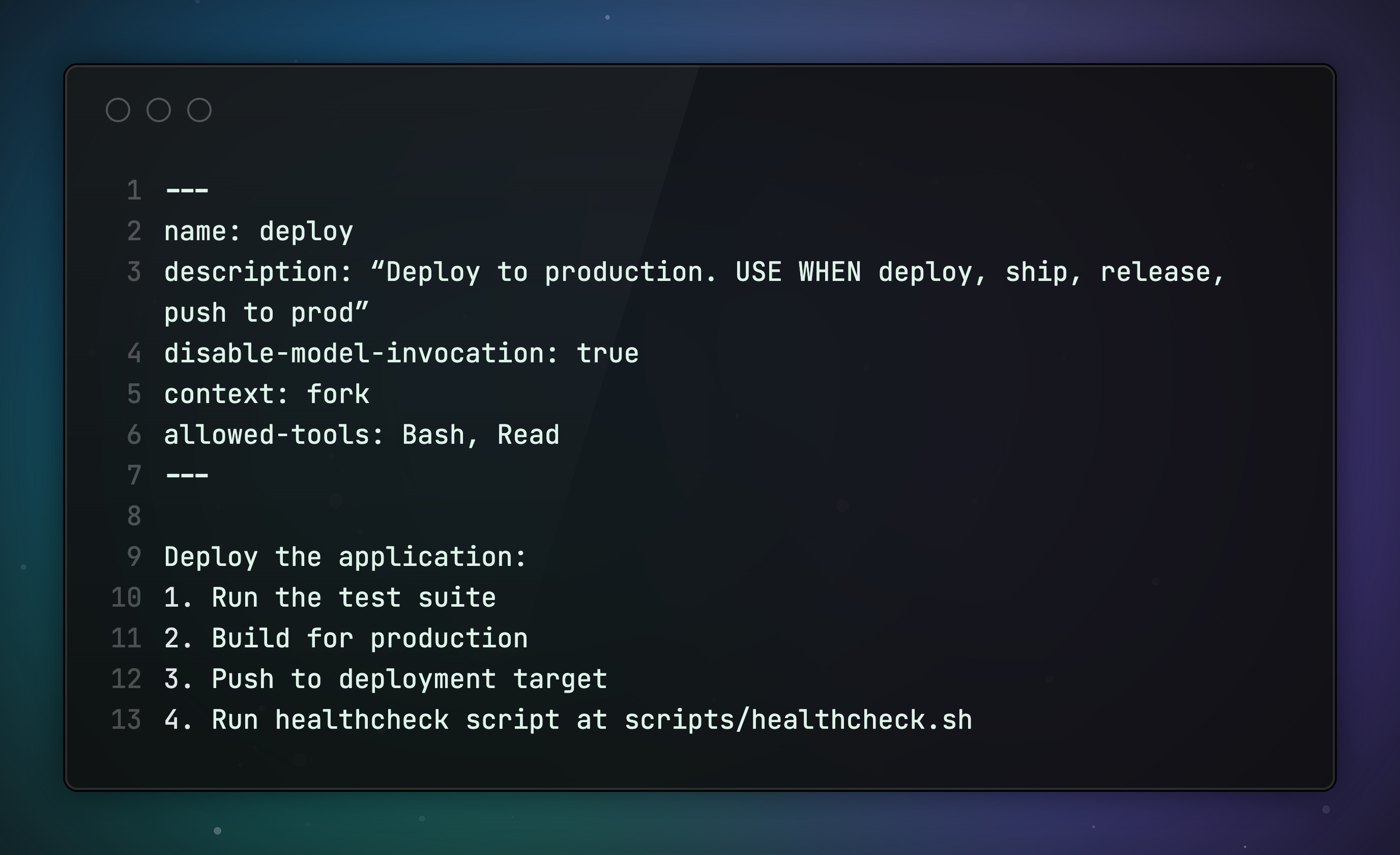
This skill only runs when you type /deploy. It runs in an isolated subagent so it doesn’t pollute your conversation. And Claude can only use Bash and Read without asking permission. Total control.
Here’s the full reference of the available fields:
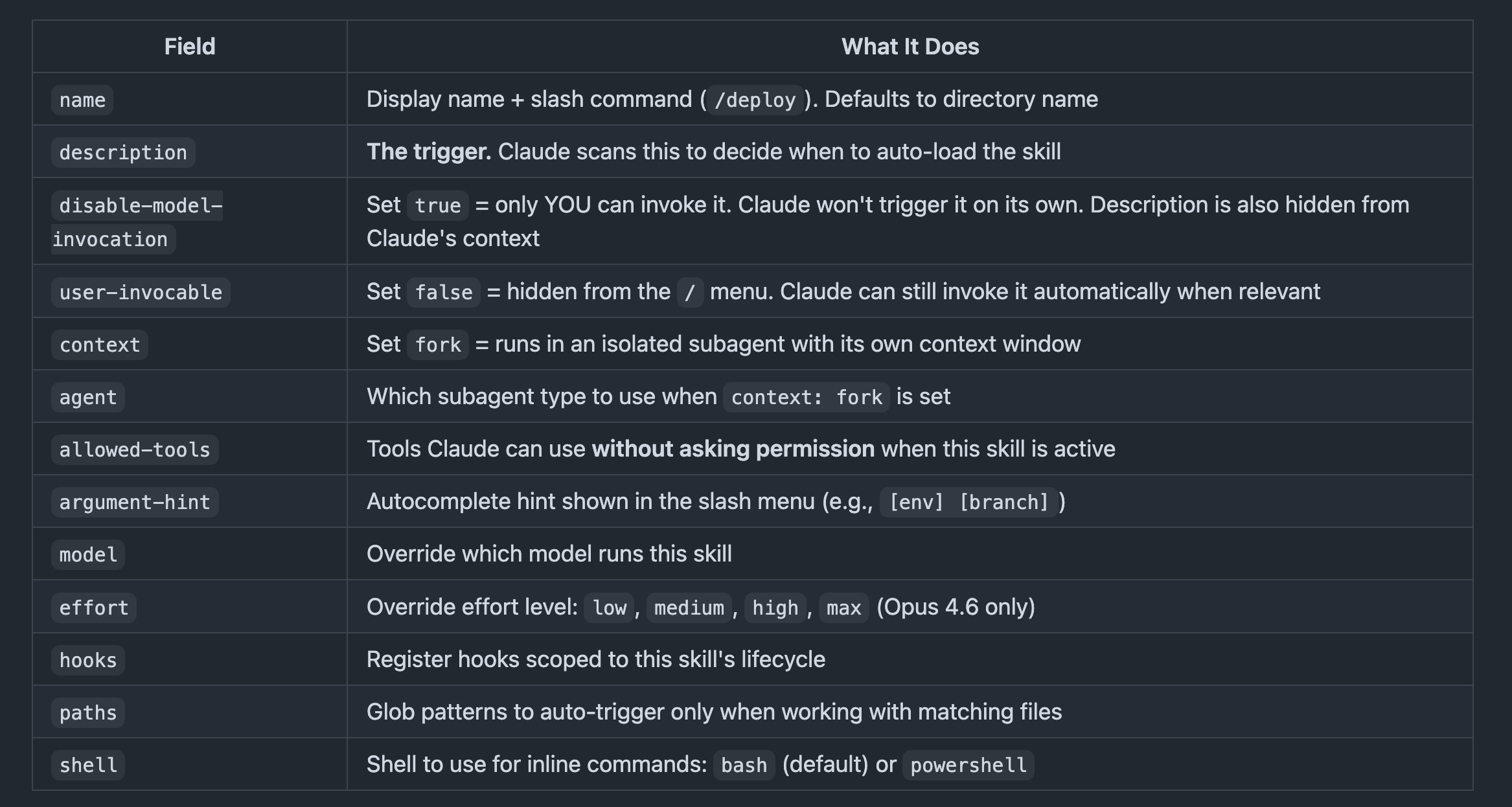
The three invocation modes:
Default (no flags): Both you and Claude can invoke it. Description is always in Claude’s context.
disable-model-invocation: true: Manual only via/name. Description is hidden from Claude’s context. Use for deploy, send-email, anything with side effects.user-invocable: false: Hidden from the/menu, but Claude can still invoke it automatically. Use for background knowledge like style guides and conventions.
Your Description Is the Trigger
This one cost me hours of debugging.
I had a skill that worked perfectly when I invoked it manually with /deploy. But Claude never picked it up on its own. I’d say “deploy this to staging” and Claude would just... wing it.
The problem was my description.
When Claude starts a session, it scans every skill’s description field to build a map of what’s available. Vague descriptions = invisible skills. Your brilliant skill just sits there, unused.
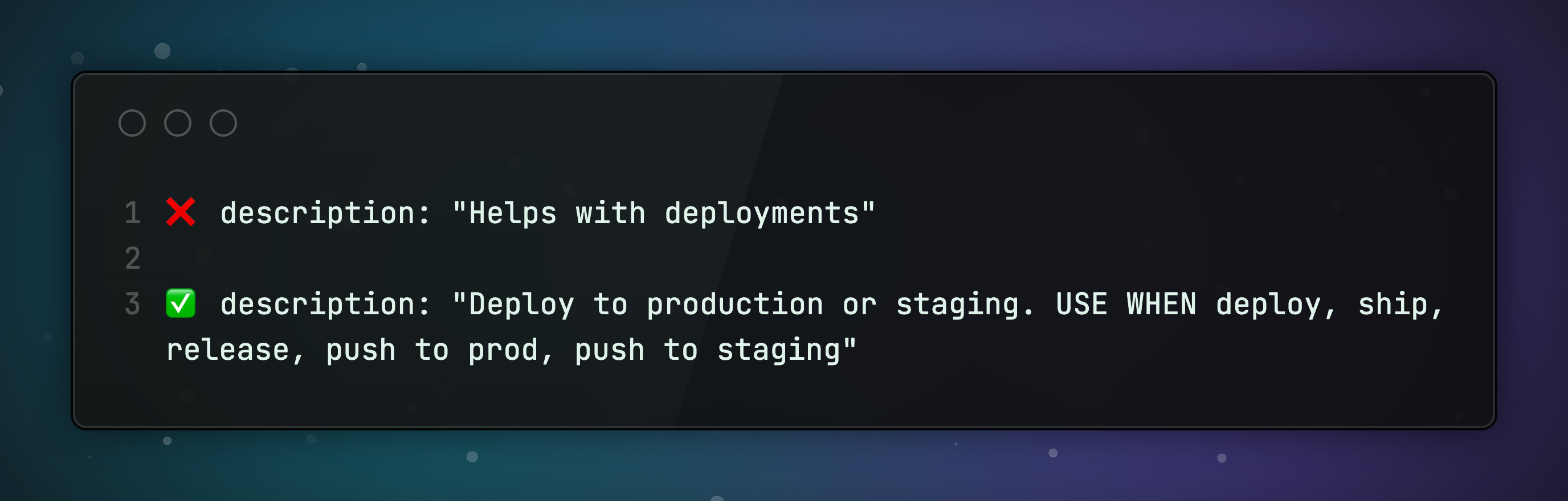
The fix is simple: Write your description for the model, not for humans. Include the trigger words someone would actually say. Be specific about WHEN to use it.
One line. That’s the difference between discoverable and disabled skills.
Three Biggest Mistakes In Skills
Stating the obvious.
Claude already knows how to code. If your skill just says “write clean functions and use meaningful variable names,” you’re wasting tokens.
Focus on what pushes Claude out of its defaults. The frontend-design skill exists because Claude defaults to Inter font and purple gradients every single time. That’s the kind of thing worth correcting.
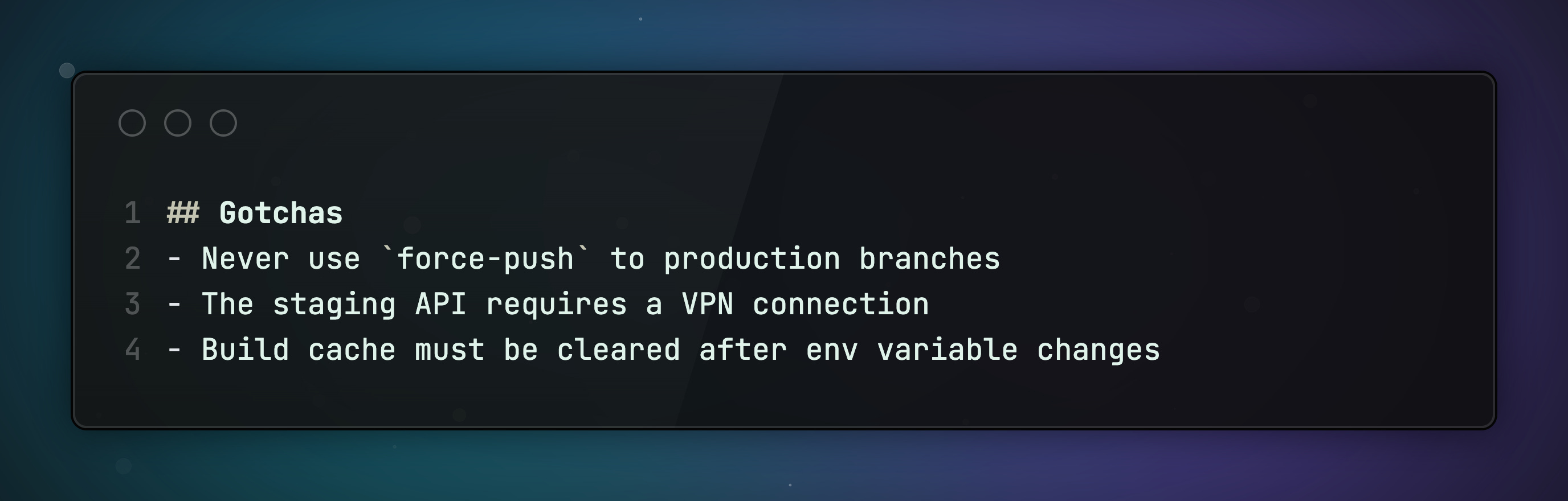
No Gotchas section.
This is the highest-signal content in any skill. Period.
Every time Claude makes a mistake using your skill, add it to the Gotchas section. Over time, this section becomes incredibly valuable.
Instructions instead of scripts.
When I started giving Claude actual scripts to compose instead of prose instructions to follow, everything changed.
Without scripts, Claude reconstructs boilerplate every single turn. With scripts, it orchestrates. It calls your deploy script, your test runner, your healthcheck. It spends its intelligence on decisions, not on remembering how your CI pipeline works.
CLAUDE.md vs Subagents vs Skills
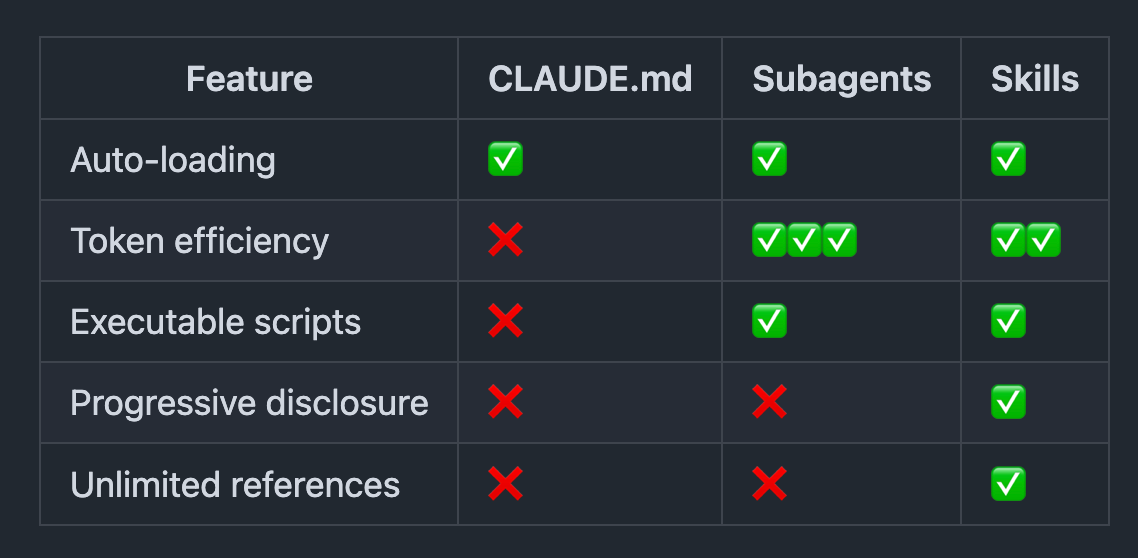
These three get confused all the time. Here’s how they’re different:
CLAUDE.md is your project’s always-on context. Conventions, rules, preferences. It loads into every session automatically. The downside: it’s always in your context window, eating tokens whether you need it or not.
Subagents are specialized workers that run in their own context window. They have custom system prompts, restricted tool access, and can even use a different model. When Claude delegates to a subagent, the work happens in a separate context. Your main conversation stays clean.
Skills are the sweet spot. They load on demand based on the description trigger. They’re folders with progressive disclosure. And they can run in a subagent context with context: fork if you want isolation.
When to use what:
CLAUDE.md: Rules that apply to EVERY conversation. Keep it lean.
Subagents: Heavy, isolated tasks. Code review that shouldn’t pollute your main context. Research across a large codebase.
Skills: Everything else. Reusable capabilities with their own files, scripts, and configuration.
Make Your Skills Portable
Where you store a skill determines who can use it:
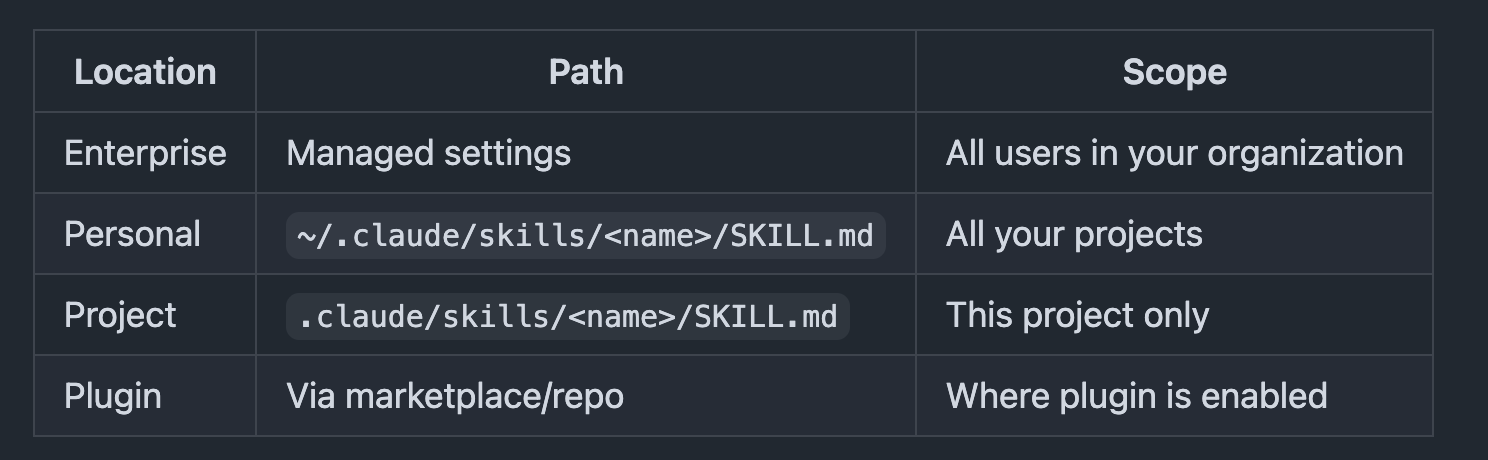
Personal skills (~/.claude/skills/) follow you across every project on your machine. Most people don’t know this exists. Anything you use across repos belongs here.
Team sharing: check skills into .claude/skills/ in your repo. Everyone gets them via git pull.
Cross-tool portability: Claude Code skills follow the Agent Skills open standard (agentskills.io). The same SKILL.md works in Cursor, Gemini CLI, JetBrains Junie, Amp, and 10+ other tools. Write once, use everywhere.
💡 Working across multiple machines? Symlink ~/.claude/skills/ to a git-synced dotfiles repo.
Where to Find Skills
You don’t have to build everything from scratch. Here’s where to find production-ready skills:
Anthropic’s Official Skills Repo
The skills that power Claude’s document capabilities (PowerPoint, Excel, Word, PDF) are open-sourced here. Plus creative, dev, and enterprise examples. You can register the entire repo as a Claude Code plugin marketplace and install skills directly.
Community marketplace for Agent Skills. Browse what others have built, install with one command, publish your own. Works with Claude Code directly.
Curated list of community skills, organized by category. Good starting point to see what’s possible.
Awesome Claude Skills (Composio)
Another solid collection with a focus on integrations and automation skills.
The open standard itself. If you want to understand the format deeply or build skills that work across Claude Code, Cursor, Gemini CLI, and other tools.
Bonus: Let Claude Build Your Skills
Don’t want to write skills from scratch? Anthropic built a Skill Creator skill that does it for you.
It’s in their official skills repo (github.com/anthropics/skills). Install it, then tell Claude what you want: “I need a skill that deploys to staging.” It will:
Interview you about what the skill should do
Write the SKILL.md with proper frontmatter
Create test prompts and run them
Show you the results for evaluation
Iterate until the skill works reliably
Optimize the description field for better triggering
It even runs benchmarks to measure how well your skill performs across different prompts. And it optimizes descriptions to combat “undertriggering,” which is Claude’s tendency to not use skills even when they’d be useful.
This is the fastest way to go from “I want a skill for X” to a production-ready skill.
Summing up
Your first skill doesn’t need to be perfect.
Start with a folder. Write a specific description. Add one gotcha.
Then grow it every time Claude gets something wrong.
That’s how every great skill starts. And that’s how you turn Claude from a smart autocomplete into a teammate that actually knows how you work.
Craft Better Software with Skills.
What’s your Claude Code setup? Reply and let me know. I read every response.
Promote Yourself to 36,000+ subscribers by sponsoring this newsletter.
Comprehensive article, Daniel!
I'd done an article about concept comparison between agents and their ecosystem—https://trendautopilot.com/p/ai-agents-model-concepts
Thank you Daniel for the solid Claude foundations! :-)