

CodeRabbit: Review the actual change, not the file list (Sponsor)

AI writes more code than ever. Reviewing it shouldn’t mean scrolling forty files in alphabetical order.
CodeRabbit Review reorganizes any pull request from a flat file list into a structured, layer-by-layer walkthrough - the logical reading order of the change, not the order your platform happens to sort it. Every range gets its own plain-language summary, with sequence diagrams, state machines, and ERDs generated inline wherever a visual earns its place.
Cohorts group related files and chunks so you review one idea at a time. Layers order them so foundational changes - data shapes, contracts - come before the code that depends on them. Code Peek lets you click any variable, function, class or type to see its definition and usages without leaving the tab, while Semantic Diff view cuts past formatting noise to show what actually changed.
Open it straight from the Review Change Stack button in the PR Walkthrough. Navigate cohorts and layers from the keyboard, comment against exact line ranges and submit native reviews, comments and approvals post back to GitHub or GitLab right where your team expects them.
In the early access, available for free to everyone.
From the team that pioneered AI code reviews. 2M reviews every week. 6M repos. 15K customers. The review interface built for the way modern PRs are actually written.
Review your next PR with CodeRabbit Review Today
Motivation
Loop-engineering is the word of the week. Peter Steinberger, the creator of OpenClaw, dropped a line (with ~20k likes and 7m views) that should change how you work:
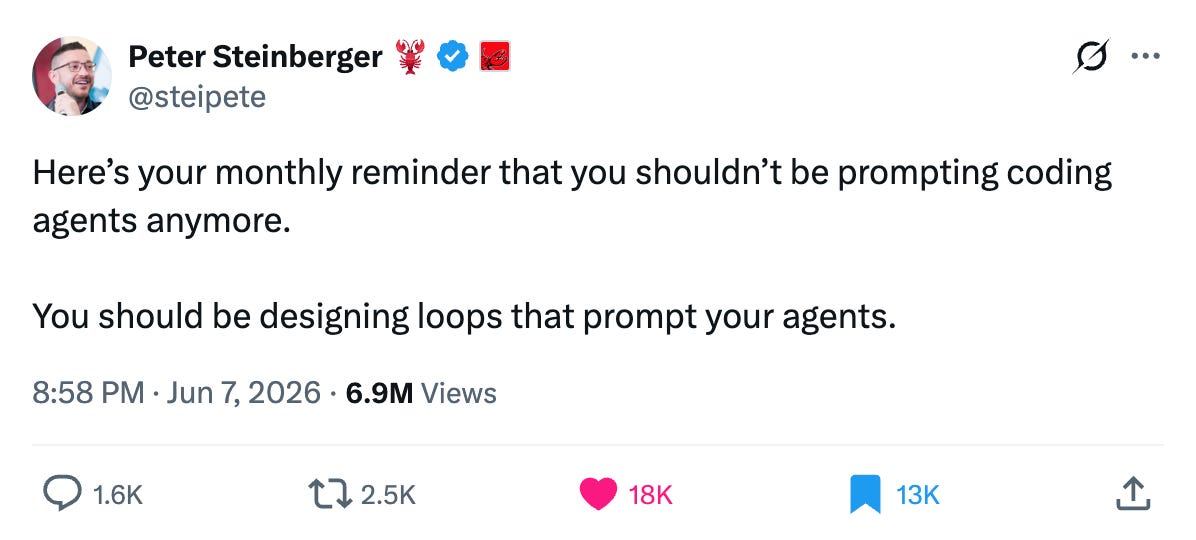
He is not alone. Boris Cherny, the creator of Claude Code, has been making the same case.
For two years we prompted agents one task at a time. Build the page. Now fix this. Now write the tests. You drove every step, and that made you the bottleneck.
Here is the shift in one line: Loop engineering is replacing yourself as the thing that prompts the agent. You build the system that does the prompting, and it runs until the goal is met.
In this article I will show you what loop engineering is, its best practices, and how you can use it in your workflows.
Let’s start!
From Prompting To Looping
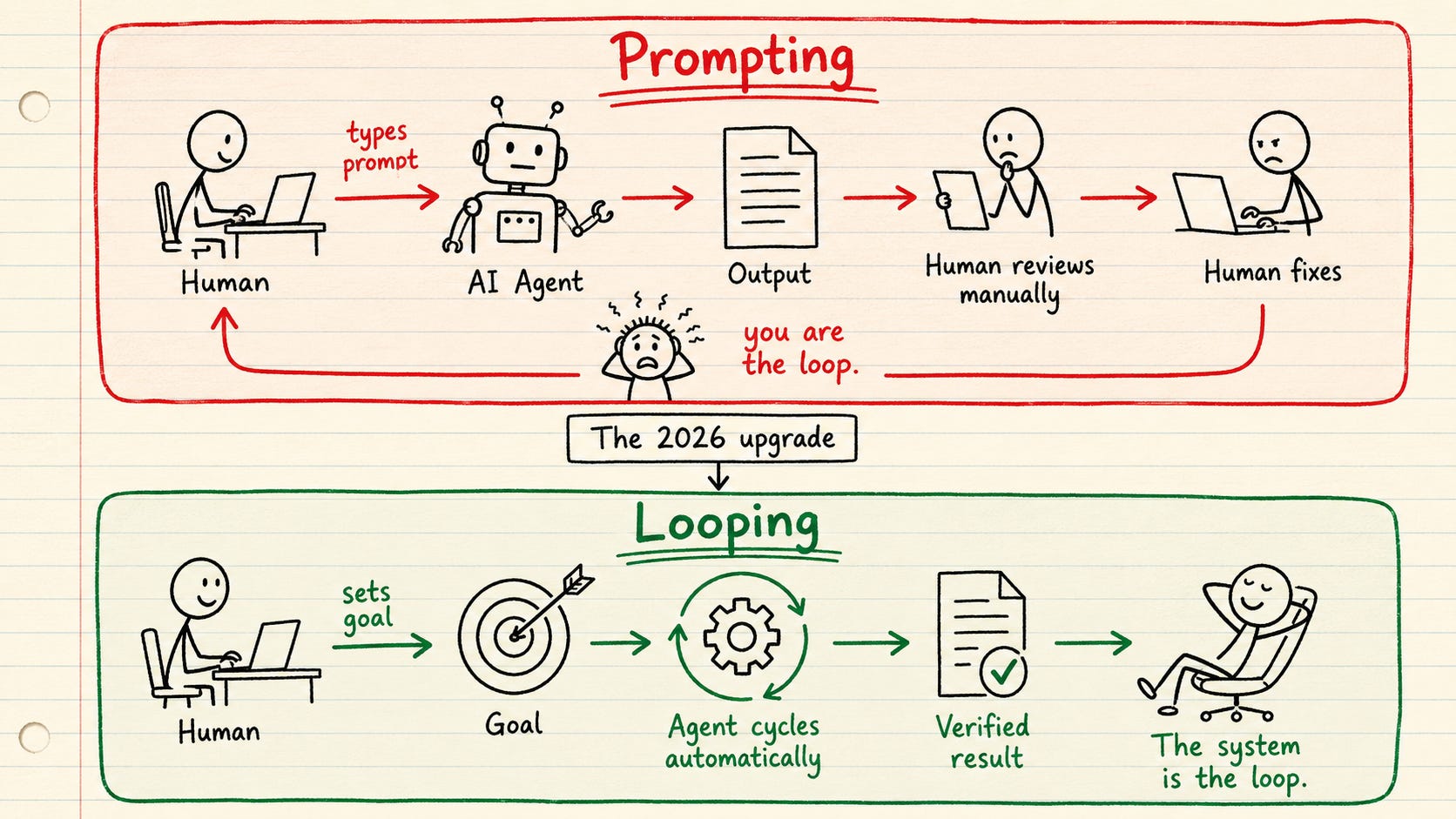
Here is the uncomfortable truth: when you prompt one task at a time, you are the slow part of the system. The agent waits for you to read the output, decide the next step, and type the next prompt. Everything runs at the speed of your attention.
A loop takes you out of that path. At its simplest it is one agent working on itself in a cycle:
Discovery: find what it needs to know
Planning: break the goal into clear steps
Execution: do the work
Verification: check the result against the goal and the standard
Iteration: fix the gaps and run again
It repeats until the work clears the bar. Picture a person rewriting their own draft. Research, write, reread against the brief, fix the weak parts, repeat. You wire the cycle once and walk away.
💡 Not every task belongs in a loop. A task is loop-ready when three things are true:
it repeats often enough to be worth wiring
it has a definition of done you can check automatically
a wrong attempt is cheap to throw away
If you cannot write the check that says “done” you cannot build the loop yet.
Open vs Closed Loops
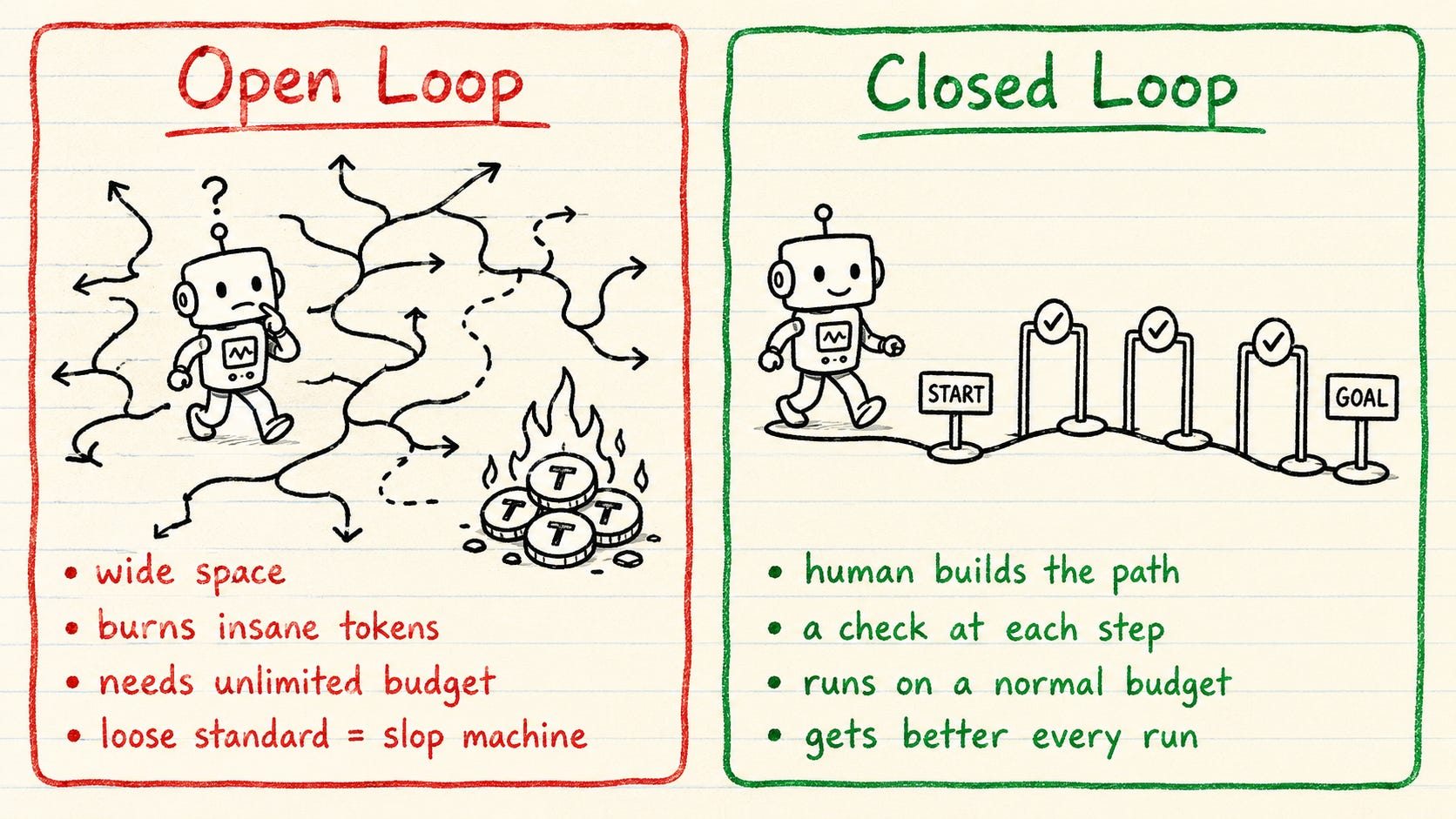
Most loop hype skips the one question that decides whether you can run this on a real budget.
Open loops are exploratory
You give the agent a wide space to roam, discover, and build things you never specced. A single-agent loop can burn 50K to 200K tokens in a run. Point a fleet of agents at an open-ended goal and you are looking at 500K to 2M. On a loose standard it becomes a fast slop machine. I have watched an open loop run all night, burn through a serious token budget, and hand back something nobody asked for. For most teams it is the wrong place to start.
Closed loops are bounded
You build the path first: a clear goal, defined steps, a check at each step, and a point where it stops or hands back to you. The agents still loop, but inside the frame you set.
The closed loop wins on the thing that matters most. It improves. Each pass feeds the next, so the loop you run a month from now is sharper than the one you start today.
The Anatomy of Closed Loops
A loop consists of 6 parts:
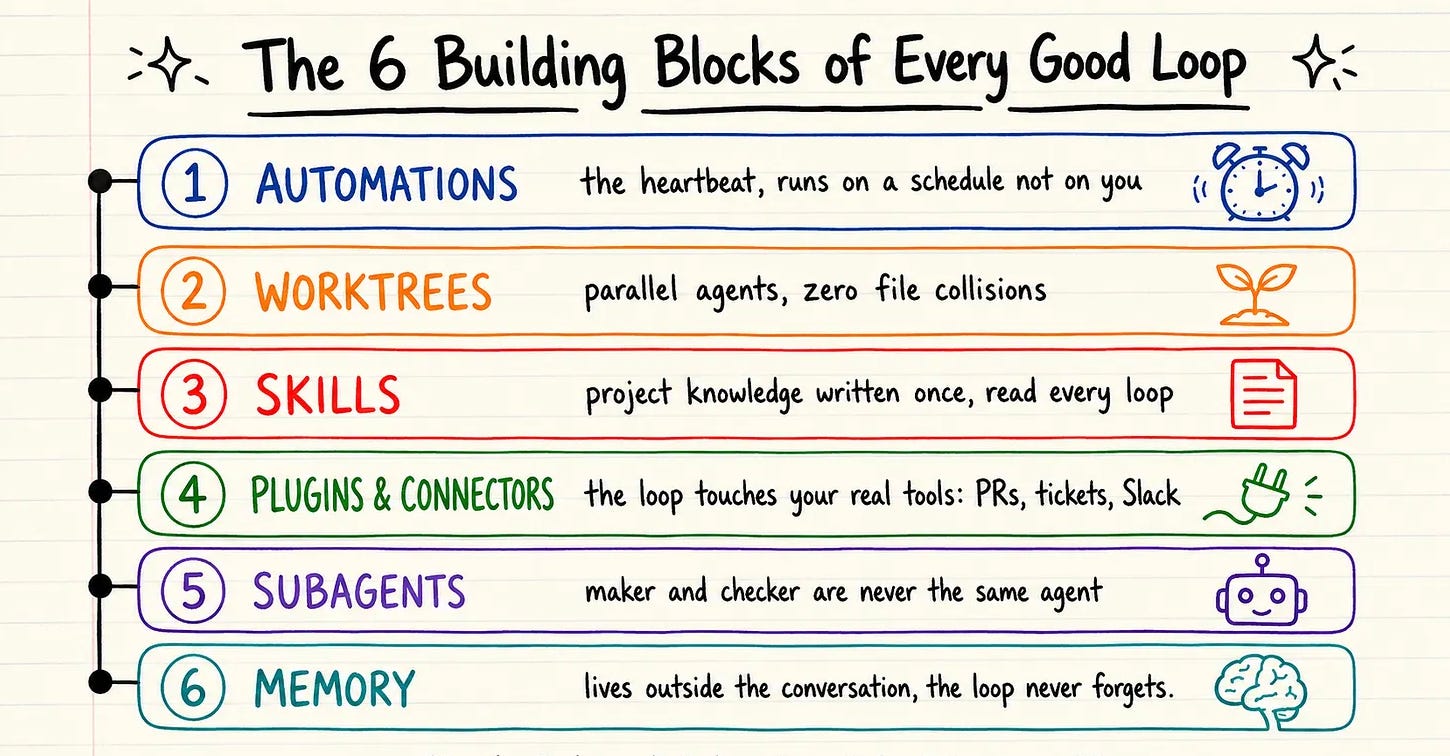
Automations: The heartbeat. The loop runs on a schedule or an event, not on you. A nightly run, a new issue, a failing build.
Worktrees: Each agent gets its own isolated branch, so parallel agents never collide on the same files.
Skills: Project knowledge written once and read every loop. The goal and rules live in files like VISION.md and RULES.md, not in a chat the agent forgets between sessions.
Plugins and connectors: The loop reaches your real tools: PRs, tickets, CI, the database, Slack. It opens the PR and updates the ticket on its own.
Subagents: A maker writes, a separate checker verifies. The agent that writes the code is never the one that approves it, or the loop just grades its own homework.
Memory: State that lives outside the conversation, on disk. The loop never starts from zero, and it never forgets what it learned.
Single Agent vs Whole Fleet
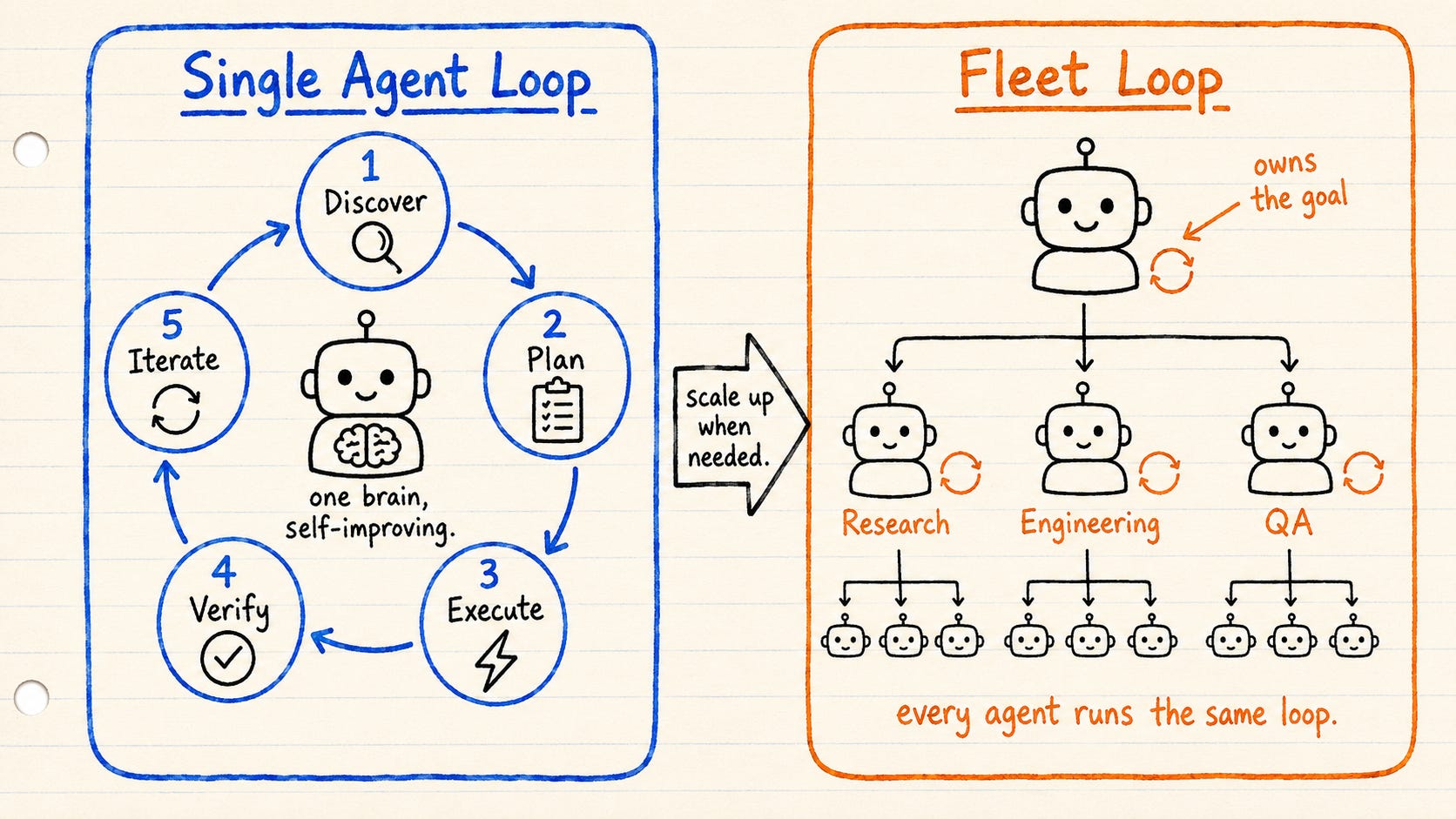
A closed loop takes one of two shapes.
A single-agent loop is one brain improving its own work. The agent runs the whole cycle on itself, discover through iterate, then goes around again until the work is good. Cheap, simple, and enough for most tasks.
A fleet loop scales that out. An orchestrator owns the goal and hands pieces to specialists: a researcher, an engineer, a reviewer. Each specialist can hand narrow work to its own subagents. Every agent in the tree runs the same five-step loop. You reach for a fleet only when one brain is not enough.
Closed Loop in Practice
A closed loop looks as follows in pseudo code:
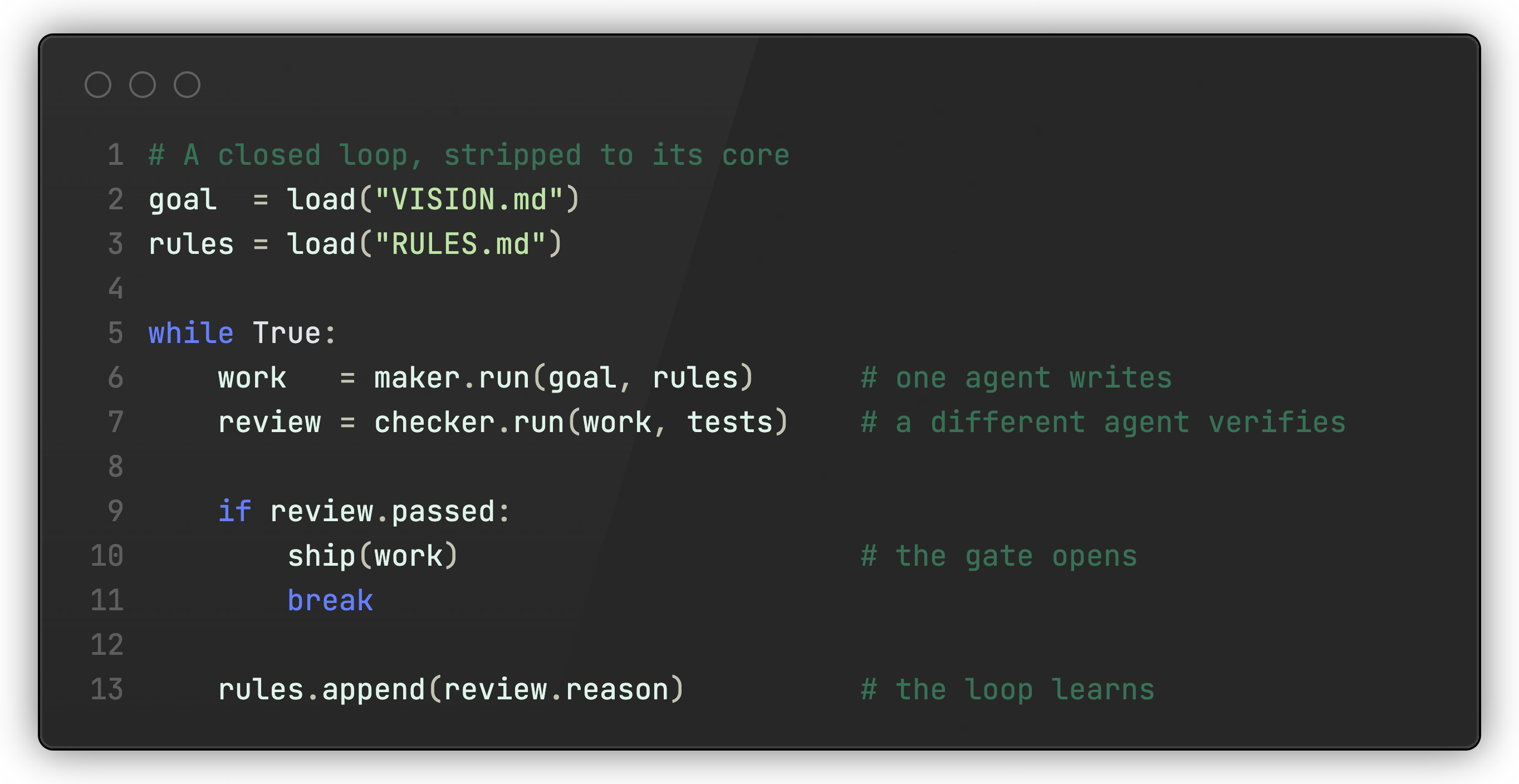
You can see the whole shape in one place: the goal and rules loaded from disk, the maker, the checker, the gate, and the one line where the loop turns a failure into a new rule.
Here is one closed loop I would actually run, end to end. Call it the analytics watcher:
A watcher polls analytics every five minutes and wakes the loop when errors spike
The loop reproduces the bug as a failing integration test.
A maker agent fixes the code in a fresh worktree until that test passes.
A checker agent runs the full suite.
The gate decides: green opens a PR and pings me on Slack, red goes back with the reason.
If it cannot fix it, it leaves the reproduced test and tags me on Slack.
If the agent makes a preventable mistake while fixing, I add it to the rules so the next run goes better.
Nothing exotic. A goal, a gate, and a memory, wired well.
Loops in Claude and Codex
Claude Code's /goal and Codex Goals already run loops for you.
You set a completion condition, the agent keeps working turn after turn, and a separate model checks each round whether the goal is met before it stops.
One caveat: codex verifies against real tests and logs, while Claude's /goal only judges what the agent reported in the conversation.
So tie your condition to something hard, like a test suite that must exit clean, not a vague agent response of "it works."
The Quality Gate
A loop without a gate produces slop faster. The gate is the check work must pass before it ships, and it is the only thing keeping the loop honest.
This is the step people skip, and it is why their loops drift. With nothing checking the work against a hard bar, the agent loops its way to confidently wrong output and calls it done
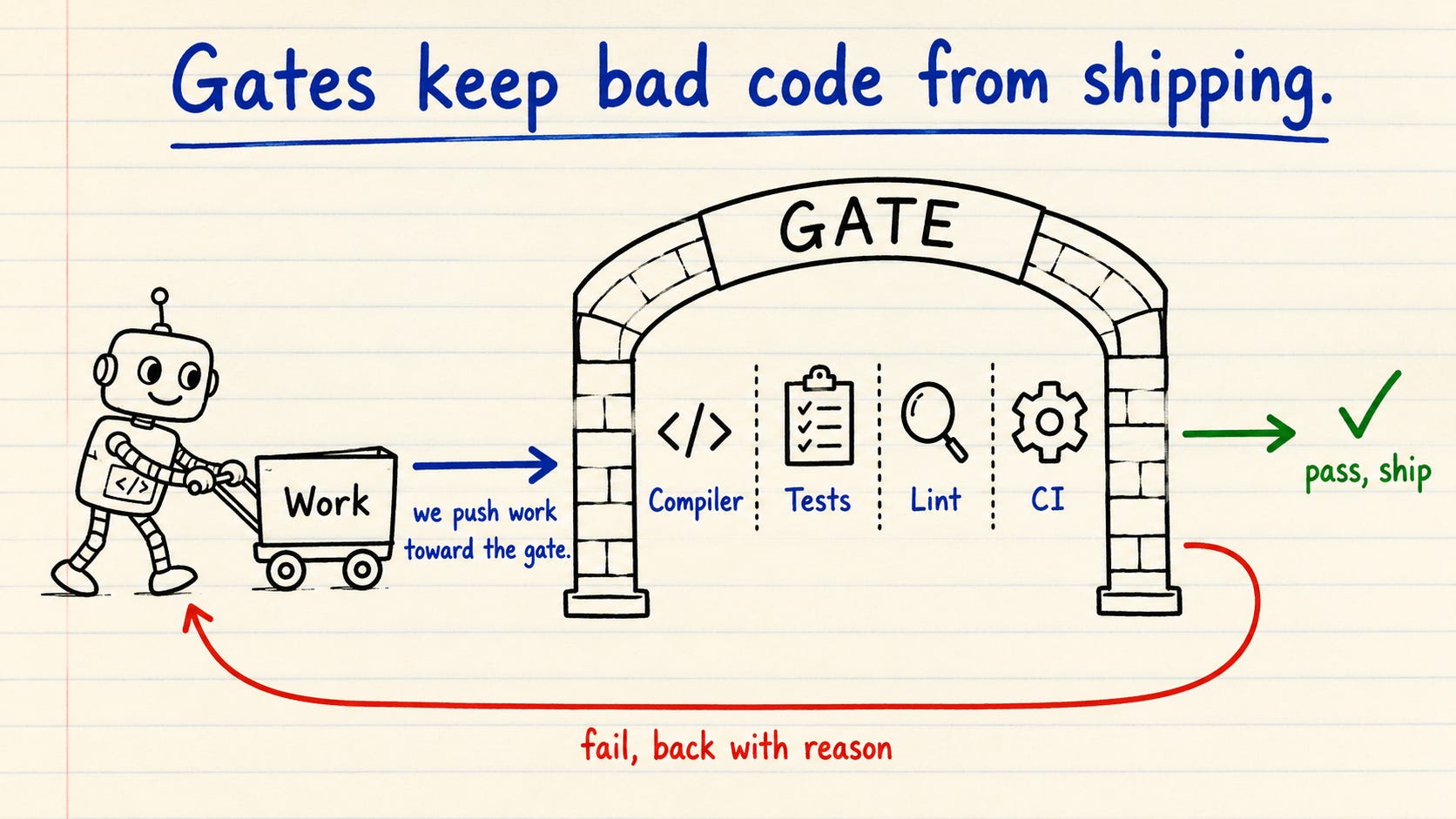
Your gate cannot be a polite review comment. An agent can rationalize past a comment. It cannot rationalize past a failing compile, a red test, or a blocked CI job. So build the gate from things the agent cannot argue with: the compiler, the type system, integration tests, mutation tests, property-based tests, linters, analyzers, and CI.
This is the same idea as the deterministic guardrails I wrote about in my previous article. The loop does the work. The guardrails decide whether it is allowed to pass.
A Loop That Learns
Your agent fixes a bug today and reintroduces it tomorrow. Not because it’s dumb. Because it forgot. A loop only improves if it can carry its lessons forward and be held to them. But the model wipes its memory between runs. So a bare loop starts every run cold, re-derives your whole project, and is just as likely to repeat yesterday’s bug.
The fix is a memory that survives between runs, kept on disk in a file you own: RULES.md
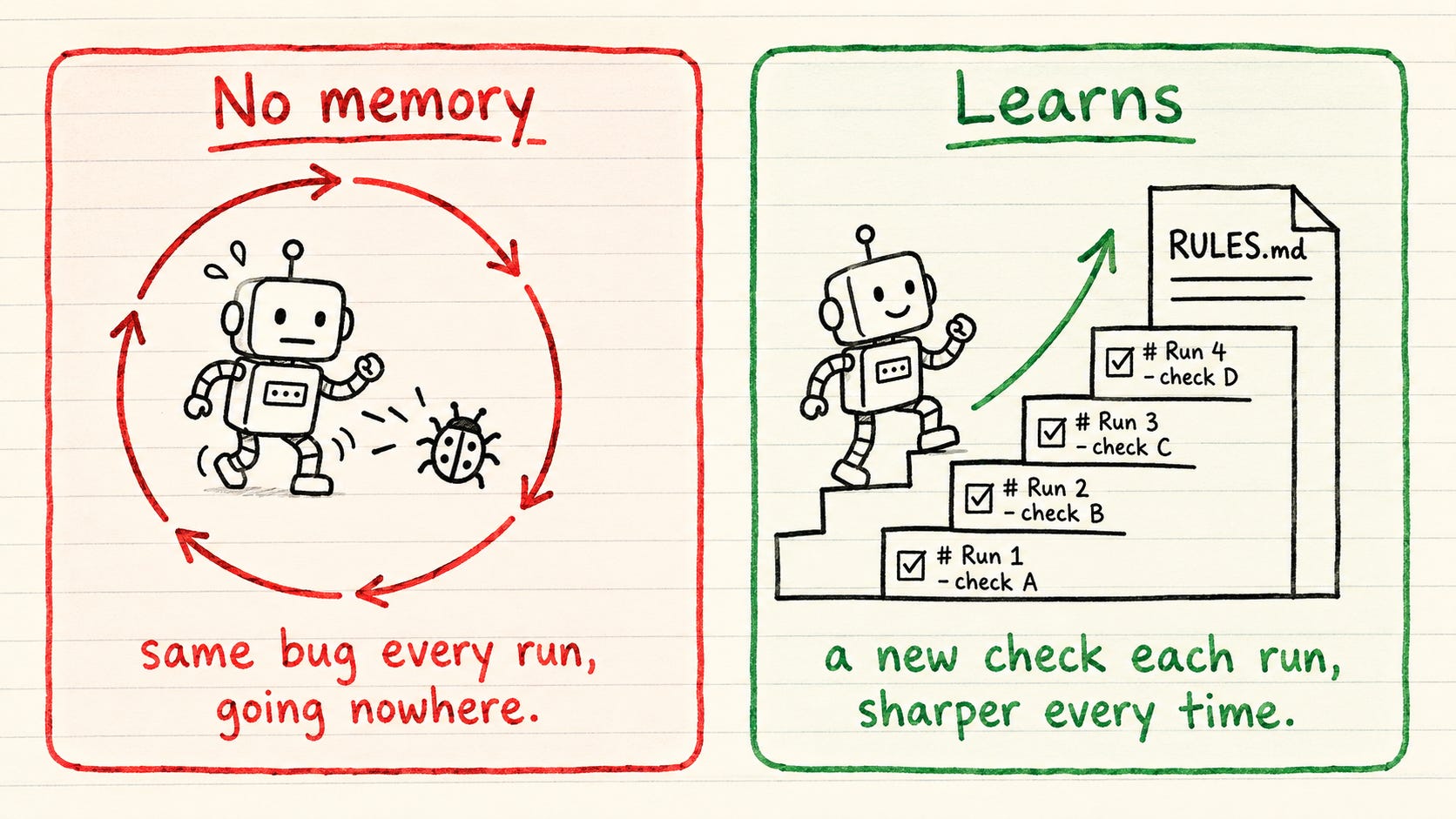
This file splits cleanly between machine and human. The loop catches the failure and reports why it broke. You decide whether it is worth a permanent rule and write it into RULES.md. The loop can draft the rule on its own, but you own the file and keep it honest. That judgment is the part that stays human.
Each time something breaks, the file grows:
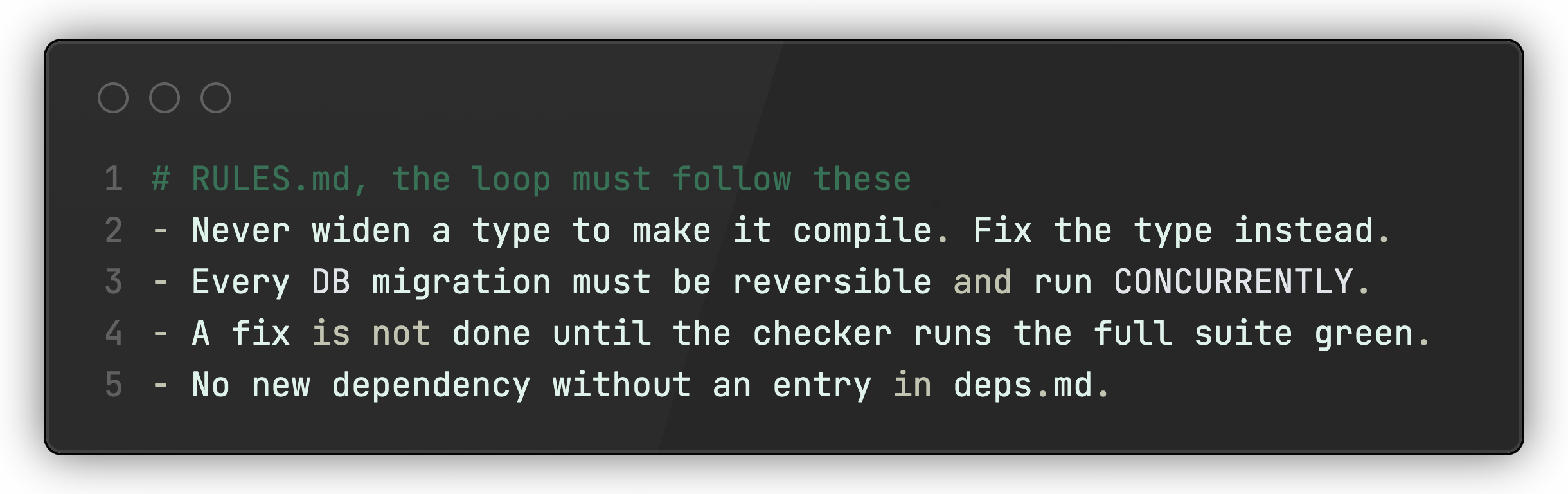
But a written rule is still a suggestion the agent can ignore. Where you can, back it with a deterministic check, a linter or a test, so the gate enforces it and the agent cannot skip it. So a mistake caught once becomes a wall forever.
Your job is not designing loops that prompt your agents. It’s designing loops that learn from experience.
From Operator to Engineer
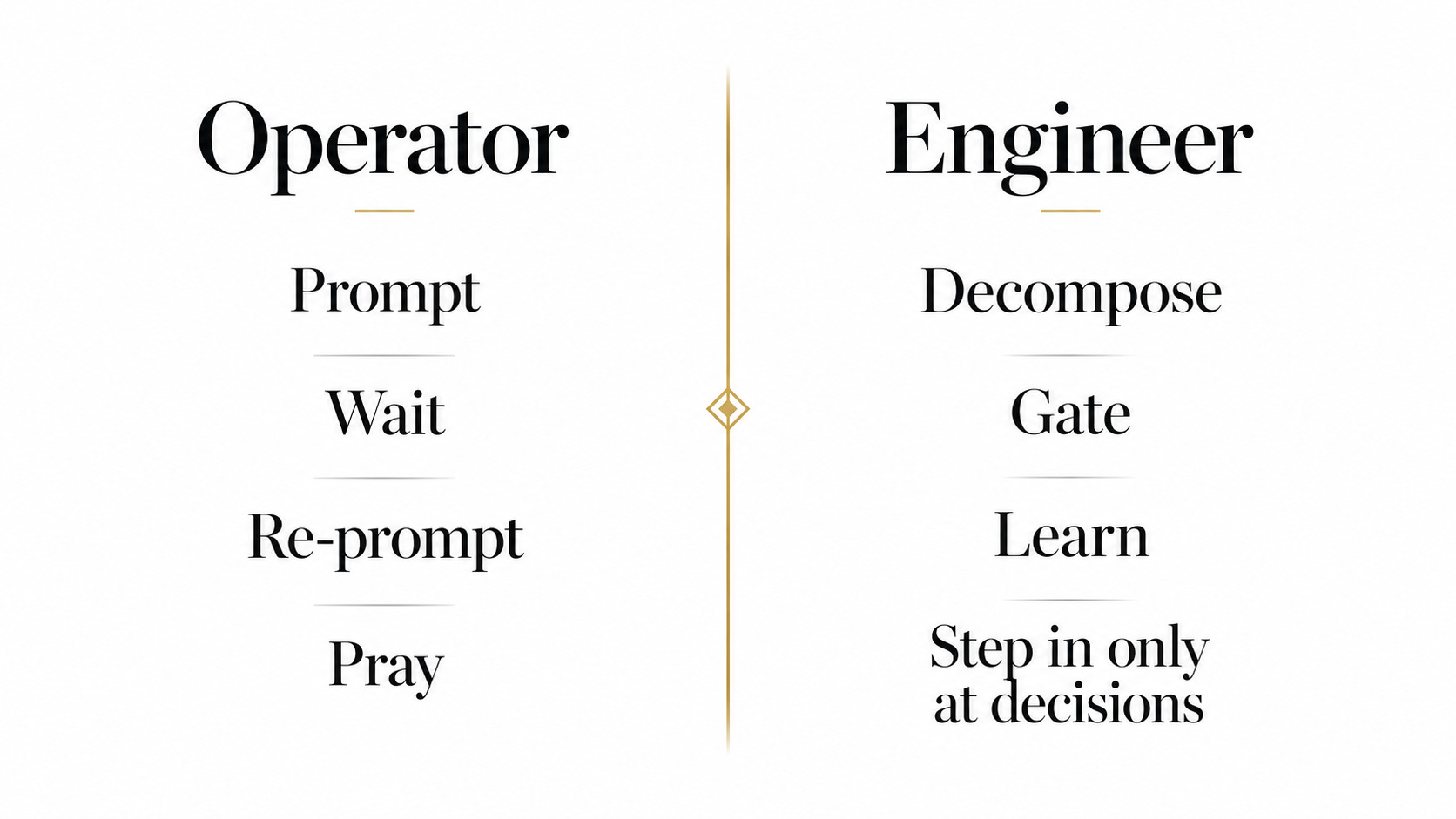
Prompting one task at a time made you the operator. Designing the loop makes you the engineer. You step in only at the decision points while the loop decomposes, executes, gates, and learns.
But don’t go all in with loops! These days, every AI related take online gets pushed to an extreme: either you run fleets of agents burning tokens around the clock, or you refuse to loop anything and prompt everything by hand.
The truth is in the middle.
Loops are worth it for the work that repeats and can be checked. Prompting by hand is still fine for the rest, and since loops burn real tokens, often less is more.
Be pragmatic, not dogmatic. That is how we Craft Better Software.
Interesting, this inspired me to try it out. I have been working in some small projects with /goal and then having the agent loop until it's done with a big set of tasks (while adhering to strict quality rules) and it worked well in a small codebase.
Interested in how it will perform when they grow bigger :)